AS2 Client
Description
AS2 is a transmission standard developed for use in the context of e-commerce. Unlike other transmission standards such as mail, X.400, or ISDN-FTP—which are not solely used in a commercial context—AS2 is specifically tailored for commercial usage.
Compared to other standards, users do not need additional technical protocols to prove revision security, as this proof is provided by receiving the MDN. Generally, AS2 communication is based on HTTP. Compared with simple HTTP communication, AS2 offers data encryption and the possibility to sign messages to prove the authenticity of the transmitter. In addition, the communication channel can be secured with TLS. On top of that, AS2 offers MDN (Message Disposition Notification) to ensure revision security.
Message Disposition Notification in Detail
The MDN is a (signed) message receipt. It contains information on whether the decryption or signature check was successful or not.
MDNs can be sent:
- Synchronously (via the same connection)
- Asynchronously (via a separate URL)
back to the client.
The AS2 Communication Flow
-
Client
- Is handed over the message to be sent
- Creates a hash sum with the message
- Signs the message with its private key
- Encrypts the message with the server’s public key
- Sends the message via HTTP / HTTPS
-
Server
- Receives the message
- Decrypts the message with its private key
- Checks the signature with the public key of the client
- Collects the success of the decryption and signature check inside an MDN message
- Signs the MDN with its private key
- Sends back the MDN
-
Client
- Receives the MDN
- Checks the MDN with the help of the server’s public key
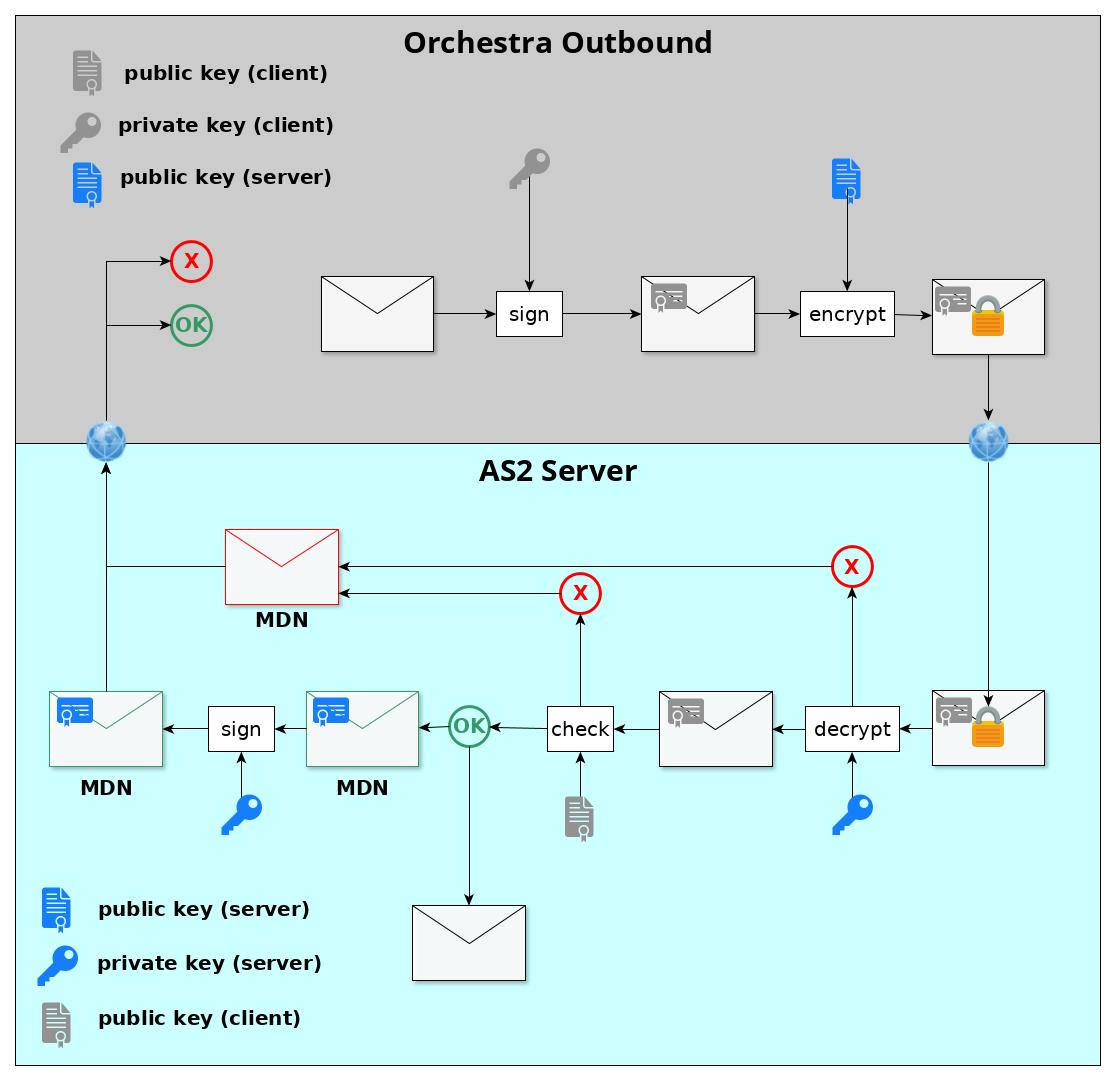 Overview of AS2 message flow
Configuration of the AS2 Client
The configuration is saved inside an Environment Entry called “AS2 Client Configuration”. This environment entry can be selected inside the channel. All settings are also displayed read-only inside the channel's panel.
Input Parameters of the AS2 Client Channel
- MSG: The Orchestra message to send
- Subject: The subject field inside the HTTP headers of the AS2 message. Can be freely chosen.
AS2 Client Configuration
The configuration contains four parts:
Partnership
- Partnership: Name of the partnership between this client and the server. Can be freely chosen.
- Client ID: Unique ID of the client. This can be chosen freely and must also be configured on the server side.
Each AS2 system has a unique identifier called the AS2 System Identifier (AS2 ID).- 1 to 128 printable ASCII characters
- Case-sensitive
- Must exactly match the ID configured on the receiving server
- Server ID: Unique ID of the server, configured on the receiving server.
Both IDs must be configured correctly, as an AS2 server can have more than one ID.
Security Configuration
-
Private Client Key: PKCS12 keystore containing the client’s private and public key.
- Used for signing messages
- The server uses the public key to validate the signature
To upload the keystore:
- Create a credential of type Technical Login
- Under Authentication, select Key-Pair (PKCS12)
- File extension is usually
.p12or.pck
Attention:
Ensure the keystore contains only one private key and the corresponding public key, and no additional certificates or keys. -
Public Server Certificate: Receiver’s certificate used to encrypt the AS2 message.
- Create a credential of type Trusted Server
- Under Authentication, choose Public Key Certificate
- Certificate files usually have the extension
.cer
-
Encryption Algorithm: Algorithm used to encrypt the message.
- Must match the server-side configuration
- If
NONEis selected, the message is not encrypted
-
Signature Algorithm: Hash algorithm used to sign the message.
- If
NONEis selected, the message is not signed
- If
-
Compression: Optional message compression before transmission.
- Available option: ZIP compression
- Can be applied before or after signing
Options:
ZIP_BEFORE_SIGNZIP_AFTER_SIGNNONE(compression disabled)
Client Configuration
- Message ID Prefix (optional): Prefix added to the automatically generated Orchestra message ID
- Server URL: URL of the receiving AS2 server
- Proxy URL (optional): Proxy environment entry with optional authentication
- Client Mail (optional): Sender email address included in the header and MDN
- Connection Timeout (ms): Timeout for establishing the TCP connection
- Read Timeout (ms): Timeout for reading data from the server
- Retry: Number of retry attempts if message delivery fails
MDN Configuration
-
MDN-Async-URL (optional):
Allows requesting an asynchronous MDN sent via a new connection to the specified URL.
If empty, MDNs are sent synchronously. -
MDN-Signature (optional):
Algorithm used by the server to sign the MDN.
IfNONEis selected, the MDN is not signed.
Export Documentation
Many parameters can be configured within the AS2 Environment Entries, allowing easy export from the designer.
By clicking on the button denoted by three dots on the AS2 Environment Entry and select Export AS2 Config, the documentation is exported as a DOCX document and zipped together with the channel’s public key certificate onto the local filesystem.